

Flow control decides the order in which statements run.
So far, every program we’ve written just goes straight from the first line to the last — no questions asked.
But what if we want our program to make decisions?
Like:
- “If it’s raining, bring an umbrella!” ☔
- “If you score 80+, show ‘Great job!’” ⭐
- “Repeat this 10 times because I said so!” 🔁
Flow control is what makes this possible. It’s how we tell a program to choose different paths, repeat certain actions, or skip others depending on the situation.
In simpler terms, flow control lets your code react:
- If something is true → do this
- Otherwise → do something else
- Or maybe → keep doing something until a condition changes
Without flow control, programs would be boring and predictable. With it, they become interactive, dynamic, and actually useful. We’ll get deeper into this soon — still no function calls yet; we’ll save those for later!
Let’s start with making decisions.
Making Decisions with if
We make decisions every day. Most of the time, those decisions depend on conditions. Computers can do the same thing. In almost all programming languages, this is handled using if-statements.
Here’s the simplest form of an if-statement in Python:
do first
if condition:
    do something
do last
This shows that do first runs first. Then the condition is checked.
If it passes, do something runs, followed by do last.
If it fails, do something is skipped and the program jumps straight to do last.
So… what exactly is condition?
Conditions and Booleans
The condition in an if-statement is an expression that can be evaluated as True or False. This uses the Boolean type.
We already mentioned Boolean in the previous post.
Now let’s see what happens when the condition evaluates to True:
age = 19
print("This always shows.")
if age > 18:
    print("You can vote.")
print("This also always shows.")The condition is True, so the indented code runs. Execution then continues normally.

An if-statement can also run more than one line. Just put them under the if-statement and indent them:
age = 19
print("This always shows.")
if age > 18:
    print("You can vote.")
    print("Your vote counts.")
print("This also always shows.")When the condition is True, all indented lines under the if statement are executed.

And here’s what it looks like when the condition evaluates to False:
age = 17
print("This always shows.")
if age > 18:
    print("You can vote.")
print("This also always shows.")The condition is False, so Python skips the indented block and continues with the next line.

Nested if Statements
You can also put an if-statement inside another if-statement. This is useful when you need a chain of decisions:
age = 65
print("This always shows.")
if age > 18:
    print("You can vote.")
    if age > 60:
        print("You are a senior citizen.")
        if age > 100:
            print("You are a centenarian.")
    print("Your vote counts.")
print("This also always shows.")Nested if statements allow decisions inside decisions. Indentation shows what belongs where.
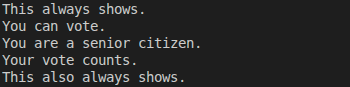
Be careful with indentation. If it’s wrong, your program might behave in unexpected ways. Sometimes, Python will even refuse to run and throw an error.
Just how important is indentation? We’ll talk about that soon.
if-else Statements
Often, we want the program to do one thing when a condition is met, and something else when it isn’t. That’s where if-else statements come in:
age = 17
print("This always shows.")
if age > 18:
    print("You can vote.")
else:
    print("You are too young to vote.")
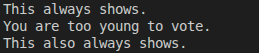
print("This also always shows.")Python picks one path: if when the condition is true, else when it’s not. No third option.
Multiple Choices with if-elif-else
Sometimes the choice isn’t just yes or no. For example, imagine a teacher assigning grades. There are more than two possible outcomes: A, B, C, D, and F.
Python handles this with an if-elif-else chain:
percentage_grade = 62
if percentage_grade >= 80:
    grade = 'A'
elif percentage_grade >= 70:
    grade = 'B'
elif percentage_grade >= 60:
    grade = 'C'
elif percentage_grade >= 50:
    grade = 'D'
else:
    grade = 'F'

print(f"You've got {grade}")Python checks conditions from top to bottom and stops at the first one that evaluates to True.

Python checks each condition from top to bottom. As soon as one condition is True, that block runs and the rest are skipped.
In this example, when Python hits elif percentage_grade >= 60, 'C' is assigned to grade, and it never checks the conditions for 'D' or 'F'.
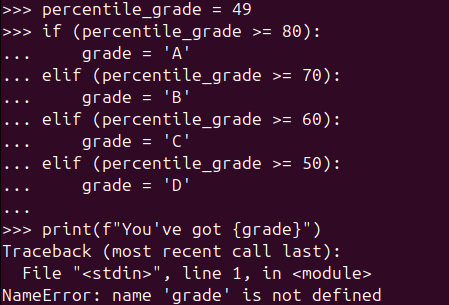
The final else is optional. But if you remove it, be careful — grade might never get a value, which can lead to an error later:
Quick Recap
- Flow control decides which code runs, when, and how many times.
ifstatements let your program make decisions based on conditions.- Conditions are Boolean expressions that evaluate to
TrueorFalse. - Indentation matters in Python — it defines which code belongs where.
- Use
iffor a single decision,if–elsefor two possible paths, andif–elif–elsewhen there are multiple outcomes. - Python checks conditions from top to bottom and stops at the first match.
Common Beginner Mistakes (Totally Normal!)
- Using
=instead of===is for assigning values.==is for comparing values.
Mixing them up is a classic beginner move — everyone does it at least once. - Forgetting indentation
In Python, indentation is not just for looks.
One extra space (or one missing space) can change the program’s behavior or cause an error. - Expecting multiple branches to run
In anif–elif–elsechain, only the first matching condition runs.
Once Python finds aTrue, it stops checking the rest. - Assuming
elseis always requiredelseis optional.
But if you skip it, make sure your variables still get assigned — otherwise you might run into errors later. - Writing overly complex conditions
Long conditions are harder to read and debug.
If it feels confusing, it probably is — break it down or simplify it.
🧠 Mini Challenge: Make the Decision
Read the code below and predict what will be printed before running it.
age = 20
has_id = False

if age >= 18 and has_id:
    print("You may enter.")
elif age >= 18 and not has_id:
    print("You forgot your ID.")
else:
print("You are too young.")Questions to think about:
- Which condition is checked first?
- Why doesn’t the first
ifrun? - Which Boolean expression evaluates to
True?
✋ Pause here. Try to answer without running the code.
✅ Spoiler: What Actually Happens
Now let’s evaluate each condition step by step.
First condition:
age >= 18 and has_idage >= 18→Truehas_id→False
So:
True and False → FalseThis means the first if block is skipped.
Second condition:
age >= 18 and not has_idage >= 18→Truenot has_id→True
So:
True and True → TrueThis condition passes, so Python prints:
You forgot your ID.Final output:
You forgot your ID.Once a condition in an if / elif / else chain matches, Python stops checking the rest — so the else block never runs.
That’s it for now.
In the next post, we’ll look at how Python helps you handle repetitive tasks without losing your sanity. 🔁
-

A Small Step Forward: Writing Cleaner Python with Modules
It Started Simple… Then It Didn’t We learned that functions help us reuse code…
-

From Variables to Real-World Objects
When Code Starts to Look Like the Real World Object-Oriented Programming, or OOP, is…
-
Teaching Python to Do the Same Thing Twice
We know what a variable is. It is a label that points to a…
Leave a Reply