
Boolean Expressions: Teaching Code to Make Decisions
We introduced the Boolean data type in a previous post. It seems very simple — the value can be either True or False.
Is it really that simple? Let’s see for ourselves.
These two variables each hold a Boolean value:
dog_has_four_legs = True
truck_is_small = False⚠️ Note that the capitalization is important! True and False must start with uppercase letters.
true, FALSE, TRUE → ❌ not valid in Python
This is the simplest way to assign a Boolean value. But in real programming, we almost never type True or False directly. Instead, those Boolean results are almost always derived from expression evaluation.
Let’s dive a bit deeper into how this evaluation works.
Equality and Inequality
To check for equality, we use the == operator (double equals).
To check for inequality, we use the != operator.
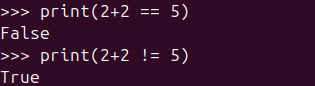
2 + 2 == 5  # False
2 + 2 != 5 # TrueDouble equals means equal. Exclamation-equals means… nope!
⚖️ Comparison Operators
Here are the comparison operators you can use:
>(greater than)<(less than)>=(greater than or equal)<=(less than or equal)
Example:
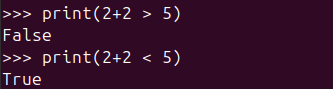
2 + 2 > 5  # False
2 + 2 < 5 # TrueMath battles: who is bigger?
🚫 Boolean Negation (not)
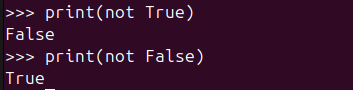
not True   # False
not False # Truenot: flipping True to False and False to True — like a light switch!
This might seem trivial, but it’s useful when checking that a condition does not match something:
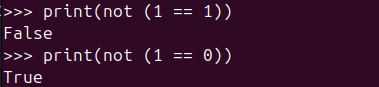
not (1 == 1)  # False
not (1 == 0) # TrueIf you want the opposite answer, just say not.
🔗 Multiple Conditions: and / or
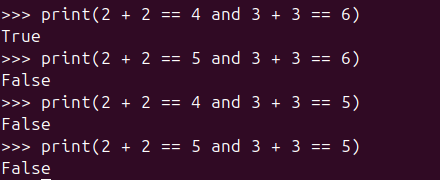
To check that all conditions are true, use and:
2 + 2 == 4 and 3 + 3 == 6 # True
2 + 2 == 5 and 3 + 3 == 6 # False
2 + 2 == 4 and 3 + 3 == 5 # False
2 + 2 == 5 and 3 + 3 == 5 # FalseAND: everyone on the team must say ‘True’.
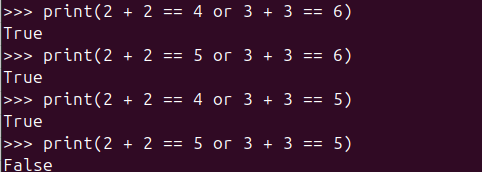
To check if at least one condition is true, use or:
2 + 2 == 4 or 3 + 3 == 6 # True
2 + 2 == 5 or 3 + 3 == 6 # True
2 + 2 == 4 or 3 + 3 == 5 # True
2 + 2 == 5 or 3 + 3 == 5 # FalseOR: at least one True and we’re happy!
Parentheses can help readability:
(2 + 2 == 4) and (3 + 3 == 6) # TrueSpacing does not affect the result.
🔠 Comparing Strings
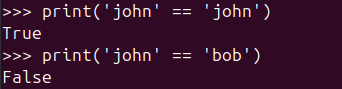
'john' == 'john'  # True
'john' == 'bob' # FalseStrings must match exactly — same letters, same case.
String comparison is case-sensitive:
'john' == 'John' # FalseCase matters! ‘john’ is not ‘John’.

Python can also compare strings alphabetically (lexicographical order):
'john' > 'bob' # TrueComparing words like they’re in the dictionary.

It’s based on Unicode ordering — we won’t go too deep here.
⚠️ Be careful with number-like strings:
'2' > '10' # True → ('2' comes after '1' alphabetically)When numbers pretend to be strings, logic gets silly.

🚫 Comparing Different Types
The comparison of different data types usually results in False, even if the values look similar:
'2' == 2 # FalseA string is a string. A number is a number.

Even lists vs tuples:
simple_list = [1, 2]
simple_tuple = (1, 2)
simple_list == simple_tuple # FalseLists ≠ Tuples (even if they seem best friends).

However, Python can implicitly convert some values:
2 == 2.0 # True (int casted to float)Python sneakily converts types when it can.

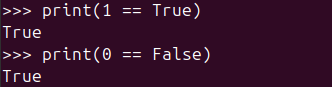
And:
1 == True   # True
0 == False # TrueTrue acts like 1, False acts like 0 — surprise!
📦 Membership: Checking Inside a Collection
Using in keyword:
For list:
scandinavian_countries = ['Denmark', 'Norway', 'Sweden']
'Denmark' in scandinavian_countries  # True
'Brazil' in scandinavian_countries # FalseChecking if something is part of a group.

And tuple:
scandinavian_countries_tuple = ('Denmark', 'Norway', 'Sweden')
'Denmark' in scandinavian_countries_tuple # True
'Brazil' in scandinavian_countries_tuple # FalseSearch inside lists and tuples like a membership check.

Even strings:
'a' in 'apple' # TrueFinding characters hiding inside a word.

📝 Quick Recap Suggestions
You can include one at the end like:
Tiny Recap
==,!=→ check equality/inequality<,>,<=,>=→ compare numbersnot,and,or→ combine conditions- Strings comparisons are case-sensitive
'value' in collection→ item exists?
Common Mistakes to Watch Out For
- Using
=(assignment) instead of==(comparison) - Forgetting that
"2"and2are not the same type - Misjudging string comparison (
'10' < '2'→ True 😬) - Boolean with numbers:
True == 1,False == 0
There are many more Boolean expression evaluations to explore! 😄
These are the basics that will help us when we start learning flow control next!
🧪 Boolean Basics — Mini Challenges
Try answering these without running Python first — just think through them!
(Then test in Python to check if you’re right 😌)
Challenge 1 — What’s the Result?
Predict the output (True or False):
3 > 57 == 7.0"Hello" == "hello"10 != 2 * 5True and FalseFalse or 5 > 2
Challenge 2 — Fix the Comparison
Which of these comparisons are incorrect? Fix them so Python won’t error:
A. "5" > 3
B. 10 = 10
C. 3 <> 1 (old-school surprise 👀)
Challenge 3 — Truthy or Falsey?
Are these considered True or False when converted to a boolean?
01""(empty string)" "(a space)[](empty list)"hello"
👇 Spoilers Below! Scroll only after attempting!
.
.
.
.
.
.
.
🧁 Boolean Challenge Solutions
✔ Challenge 1
3 > 5→ False7 == 7.0→ True (same numeric value)"Hello" == "hello"→ False (case matters!)10 != 2 * 5→ False (2*5 = 10)True and False→ FalseFalse or 5 > 2→ True (5 > 2 is True, andoronly needs one True)
✔ Challenge 2
A. "5" > 3 ❌ (string vs number not allowed)
Fix: compare same types —int("5") > 3 → True
or"5" > "3" → True (string comparison by character order)
B. 10 = 10 ❌ (= is assignment)
Fix: 10 == 10 → True
C. 3 <> 1 ❌ (Python 2 relic)
Fix: 3 != 1 → True
✔ Challenge 3 — Truthiness
| Expression | Boolean Value | Why |
|---|---|---|
0 | False | Zero means “nothing here” |
1 | True | Any non-zero number is True |
"" | False | Empty string = False |
" " | True | A space is still something |
[] | False | Empty container = False |
"hello" | True | Non-empty content |
3 > 5→ False7 == 7.0→ True (same numeric value)"Hello" == "hello"→ False (case matters!)10 != 2 * 5→ False (2*5 = 10)True and False→ FalseFalse or 5 > 2→ True (5 > 2 is True, andoronly needs one True)
You’ve unlocked the power of Boolean logic — the key to decision-making.
Next stop on our programming journey: Flow Control, where your code learns to react, choose paths, and avoid danger like a real adventurer! ⚔️✨
-
A Small Step Forward: Writing Cleaner Python with Modules
It Started Simple… Then It Didn’t We learned that functions help us reuse code and…
-

From Variables to Real-World Objects
When Code Starts to Look Like the Real World Object-Oriented Programming, or OOP, is a…
-
Teaching Python to Do the Same Thing Twice
We know what a variable is. It is a label that points to a value.…

Leave a Reply