

In the previous post, we talked about basic data types along with their methods and operators. Now, let’s move on to one of the most commonly used collection data types: the list.
A list is a collection where you can store related elements (or even completely unrelated ones 😁). Order matters in a list, and we can directly access elements by their index — no need to search through them one by one.
In Python, square brackets [] are used to define a list. Elements are separated by commas. Let’s create a simple list:
days = ['Sunday','Monday','Tuesday','Wednesday','Thursday','Friday','Saturday']When we print this list, Python shows all the elements inside square brackets:

Accessing elements by index
Python lists are zero-indexed, meaning the first element has index 0. For example, to get the second element:
mon = days[1] # Monday
You can also access elements from the end of the list using negative indexes. -1 refers to the last element, -2 the second-to-last, and so on:
fri = days[-2] # Friday
Changing elements
We can update any element by assigning a new value to its index:
days[3] = 'Midweek'
# ['Sunday', 'Monday', 'Tuesday', 'Midweek', 'Thursday', 'Friday', 'Saturday']
Adding elements
To add an element at the end of a list, use append():
days.append('Holiday')
# ['Sunday', 'Monday', 'Tuesday', 'Midweek', 'Thursday', 'Friday', 'Saturday', 'Holiday']
To insert an element at a specific position, use insert(index, value) — existing elements will shift to the right:
days.insert(1, 'Workday')
# ['Sunday', 'Workday', 'Monday', 'Tuesday', 'Midweek', 'Thursday', 'Friday', 'Saturday', 'Holiday']
Removing elements
If you know the index of what you want to remove, use del:
del days[2]
# ['Sunday', 'Workday', 'Tuesday', 'Midweek', 'Thursday', 'Friday', 'Saturday', 'Holiday']
If you want to use the removed value later, use pop().
- With an index → removes that element and returns it
- Without an index → removes and returns the last element
midweek = days.pop(3)  # Midweek
holiday = days.pop()   # Holiday
# days = ['Sunday', 'Workday', 'Tuesday', 'Midweek', 'Friday', 'Saturday']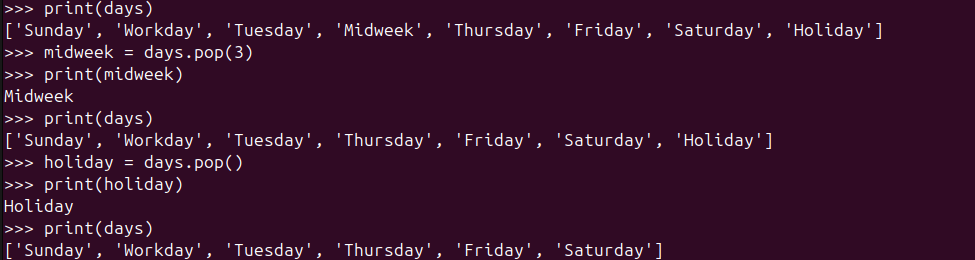
If you know the value but not the index, use remove().
Note: It only removes the first matching value:
days.remove('Workday')
# ['Sunday', 'Tuesday', 'Thursday', 'Friday', 'Saturday']
Sorting lists
Python offers two ways to sort:
| Method | Changes original list? | Returns a new list? |
|---|---|---|
sort() | ✔️ Yes | ❌ No |
sorted() | ❌ No | ✔️ Yes |
Example:
programming_languages = ['python', 'java', 'c#', 'go', 'haskell']
print(sorted(programming_languages))
# ['c#', 'go', 'haskell', 'java', 'python']

print(programming_languages)
# ['python', 'java', 'c#', 'go', 'haskell']

programming_languages.sort()
print(programming_languages)
# ['c#', 'go', 'haskell', 'java', 'python']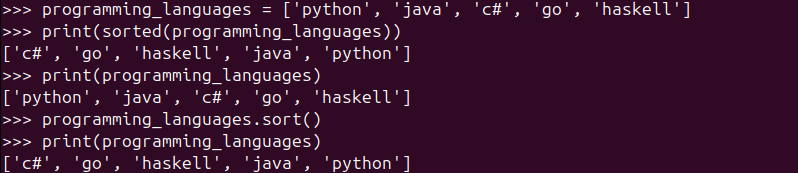
To sort in reverse order, add reverse=True:
programming_languages = ['python', 'java', 'c#', 'go', 'haskell']
print(sorted(programming_languages, reverse=True))
# ['python', 'java', 'haskell', 'go', 'c#']

programming_languages.sort(reverse=True)
print(programming_languages)
# ['python', 'java', 'haskell', 'go', 'c#']Reversing a list
To flip the list as-is (not alphabetically sorted), use reverse():
programming_languages = ['python', 'java', 'c#', 'go', 'haskell']
programming_languages.reverse() # ['haskell', 'go', 'c#', 'java', 'python']
Length of a list
To find how many elements are inside a list, use len():
len(programming_languages) # 5
📝 Quick Recap
Here’s what we learned about lists today:
- Lists use square brackets
[] - Elements are ordered and modifiable
- You can access items using indexes (including negative indexes)
- Lists have methods to:
- add items →
append(),insert() - remove items →
del,pop(),remove() - reorder items →
sort(),sorted(),reverse()
- add items →
- Use
len()to check how many items are inside the list
Lists are super flexible, which is why they’re one of the most used data types in Python 🎯
⚠️ Common Mistake to Avoid
1️⃣ Index Out of Range
Trying to access an index that doesn’t exist will cause an error:
days = ['Sunday', 'Monday']
print(days[5]) # ❌ IndexErrorMake sure the index is valid (0 to len(list)-1).
🏆 Mini Challenge: Build Your Own To-Do List
You’re going to create a simple to-do list and practice modifying it as things change!
Your tasks:
1️⃣ Create a list named todo with at least 3 tasks
Example: ['Study Python', 'Clean room', 'Walk dog']
2️⃣ Print the first and last task
(Hint: use index 0 and negative index -1)
3️⃣ Add a brand-new task using append()
4️⃣ You finished one of the tasks — remove it using remove() or pop()
5️⃣ Print your final to-do list to see your progress 🎉
Expected example output
(It will look different based on your own list!)
First task: Study Python
Last task: Walk dog
After adding: ['Study Python', 'Clean room', 'Walk dog', 'Drink water']
After removing: ['Clean room', 'Walk dog', 'Drink water']
🕵️ Spoiler: One Possible Solution
Click to reveal the solution 👀
# Step 1: Create a list
todo = ['Study Python', 'Clean room', 'Walk dog']

# Step 2: Print first and last task
print("First task:", todo[0])
print("Last task:", todo[-1])

# Step 3: Add a new task
todo.append('Drink water')
print("After adding:", todo)

# Step 4: Remove a finished task
done = todo.pop(0)  # assuming we finished the first task
print(f"Removed: {done}")
print("After removing:", todo)Blog
This section provides an overview of the blog, showcasing a variety of articles, insights, and resources to inform and inspire readers.
-

A Small Step Forward: Writing Cleaner Python with Modules
It Started Simple… Then It Didn’t We learned that functions help us reuse code and…
-

From Variables to Real-World Objects
When Code Starts to Look Like the Real World Object-Oriented Programming, or OOP, is a…
-
Teaching Python to Do the Same Thing Twice
We know what a variable is. It is a label that points to a value.…

Leave a Reply