

We now know about different variable types. The next step is: what can we do with them?
In this post, we’ll look at two types you’ll see the most: Number and String.
One thing before we start — operations in Python don’t modify the existing values for numbers or strings. They are immutable, so operations create new values. You either store the result in a new variable or assign it back to the original.
🔢 Number Type Basics
Python supports arithmetic operations such as addition (+), subtraction (-), multiplication (*), division (/), and remainder (%). It also has a few extra ones that help in calculations.
Let’s start with two variables:
a = 8
b = 3We can do:
a + b  # addition
a - b  # subtraction
a * b  # multiplication
a / b # divisionHere’s the result:
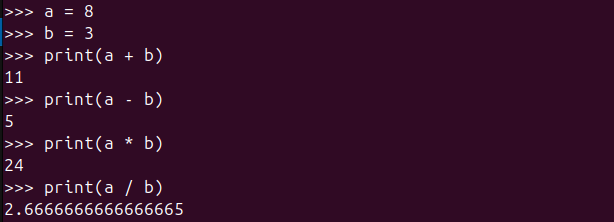
So far, so good, right?
Well… mostly.
Number types in Python include int, float, and complex.int is for whole numbers, and float is for decimal numbers.
(Note: complex numbers are used in math/engineering, so we’ll skip them for now.)
A small surprise:
Even when dividing two integers, the result is always a float:

Let’s look closely at this number:
8 / 3 → 2.6666666666666665
This isn’t a Python bug — it’s how floating-point numbers behave in almost every language.
When mixing an int with a float, the result becomes float:
x = 3
y = 0.2

x + y  # 3.2
x - y  # 2.8
x * y  # 0.6000000000000001 (floats can be weird sometimes!)
x / y # 15.0See it in action:
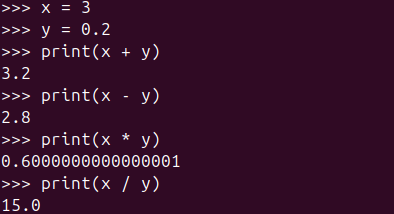
➕ Extra Number Operations
Python supports:
| Operator | Name | Example |
|---|---|---|
% | Modulus — remainder of division | 8 % 3 → 2 |
** | Exponentiation — power | 8 ** 3 → 512 |
// | Floor division — drop decimals | 8 // 3 → 2 |
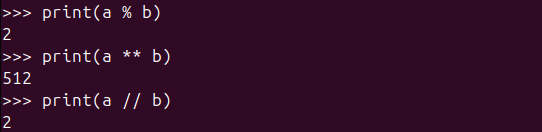
🔺 Order of Operations
Just like math class: * and / go before + and -
Parentheses take priority:
1 + 1 * 2     # 3
(1 + 1) * 2 # 4✍️ Shorthand Operations
Updating a variable based on its current value:
i = 5
i += 1  # 6
i -= 2  # 4
i *= 3  # 12
i /= 4  # 3.0 (float again!)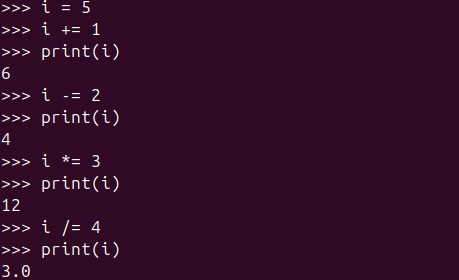
🔟 Underscores in Numbers
Need readability? Use underscores:
million = 1_000_000Yes — the underscores don’t change the value.
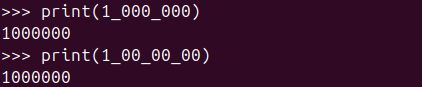
(Note: While underscores can appear anywhere in a number, weird placements like 1_00_00_00 are technically valid but not recommended stylistically.)
🧵 Strings
A string is just text inside quotes — and in Python, you can use either single quotes (' ') or double quotes (" ").
This flexibility isn’t just for style — it helps when your text itself contains quotes, so you don’t have to escape them manually.
Check these out:
single_quote = 'Cow says "moo"'
double_quote = "Merry X'Mas"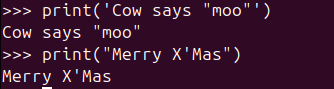
But if you stick to only one type… well… you’ll run into this kind of thing:
escape_example = "Cow says \"moo\""   # extra backslashes 😩
escape_example_2 = 'Merry X\'Mas' # cluttered and harder to readSo yes — Python gives you both options to keep your strings nice and readable. 😄
🔤 Changing Letter Cases
Python provides several helpful methods to change the capitalization of text. These are especially useful when formatting user input, standardizing text, or preparing data for display.
upper()
Converts all characters in a string to uppercase.
Example:"hello".upper()→"HELLO"lower()
Converts all characters in a string to lowercase.
Example:"HELLO".lower()→"hello"title()
Capitalizes the first letter of each word in a string.
Example:"hello world".title()→"Hello World"
python_lang = "monty PYTHON"

python_lang.upper()  # MONTY PYTHON
python_lang.lower()  # monty python
python_lang.title() # Monty PythonSee it in action:
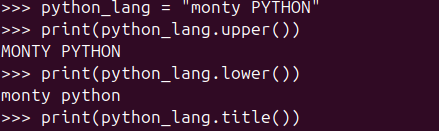
Fun fact: Yes, Python is named after Monty Python the comedy group! 🎭
📏 Working With Whitespace
Whitespace refers to characters that take up space but are not visible when printed on the screen. They separate words and lines in text and include things like the spacebar, tabs, and new lines.
Whitespace = spaces, tabs, newline characters.
| Escape | Meaning |
|---|---|
\t | tab |
\n | new line |
\\ | backslash |
Examples:
"Income\tExpenditure\tRevenue"
"Languages\nPython\nJava\n.NET"
"C:\\Users\\Fatamorgana"Let’s see how it actually looks like:

✂️ Removing Whitespace
Useful when cleaning input:
python = "   python   "

python.lstrip()  # "python   "
python.rstrip()  # "   python"
python.strip()   # "python"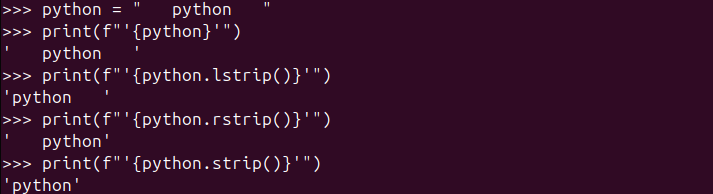
You may confuse with the image above (f"..."). We will talk about it in a few minutes.
🪄 Removing Prefix or Suffix
strange = "Dr. Stephen Strange MD, Ph.D"

strange.removeprefix("Dr. ")      # "Stephen Strange MD, Ph.D"
strange.removesuffix(" MD, Ph.D") # "Dr. Stephen Strange"🔁 Replacing Part of a String
"Hello, world!".replace("Hello", "Hola") # Hola, world!
🧩 F-Strings — The Best String Tool
F-strings let you put variables and expressions directly in {}:
name = "alice"
f"I'm {name}"        # I'm alice
f"My name is {name.title()}"    # My name is Alice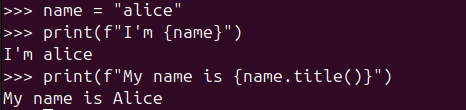
Math works inside too:
f"3 + 2 = {3+2}" # 3 + 2 = 5
Formatting numbers:
pi = 3.1415926
f"Pi is {pi:.2f}"  # Pi is 3.14
million = 1000000
f"A million is {million:,}" # A million is 1,000,000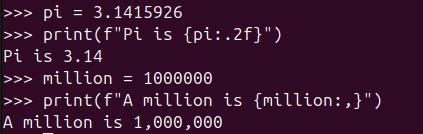
Debugging trick:
name = "Bob"
f"{name=}"   # name='Bob'
Literal braces?
f"Use {{ and }} to show braces"
Multi-line f-strings use triple quotes:
weekend = f"""Saturday
Sunday"""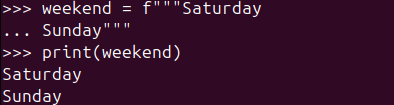
🎯 Wrapping Up
You now know:
✔ Arithmetic and number operations
✔ String methods and escapes
✔ Cleaning and formatting text
✔ How to use f-strings (super useful)
Blog
This section provides an overview of the blog, showcasing a variety of articles, insights, and resources to inform and inspire readers.
-

A Small Step Forward: Writing Cleaner Python with Modules
It Started Simple… Then It Didn’t We learned that functions help us reuse code and…
-

From Variables to Real-World Objects
When Code Starts to Look Like the Real World Object-Oriented Programming, or OOP, is a…
-
Teaching Python to Do the Same Thing Twice
We know what a variable is. It is a label that points to a value.…

Leave a Reply